.png?width=684&height=209&name=YouLead%202024%20-%20Digital%20Growth%20Agency%20branco-laranja%20(1).png "YouLead 2024 - Digital Growth Agency branco-laranja (1)")

June 23, 2021
We often tend to refer to HubSpot as a marketing automation platform, but the truth is that this tool allows companies to centralize not only their marketing activities but also their sales activities.
And, just as with marketing, HubSpot offers a wide range of reports that allow you to closely monitor various metrics related to sales activity.
HubSpot’s sales reports use data from the CRM to provide relevant insights into the effectiveness of sales efforts—all in a simple, customizable, and virtually automated way, without the need for Excel files or other manual tools.
So, what reports can you create in your HubSpot account? The answer is: dozens! That’s why we’re going to share with you the main types of sales reports and the ones we consider “must-haves.”
1 -Deal Forecast and Pipeline Reports
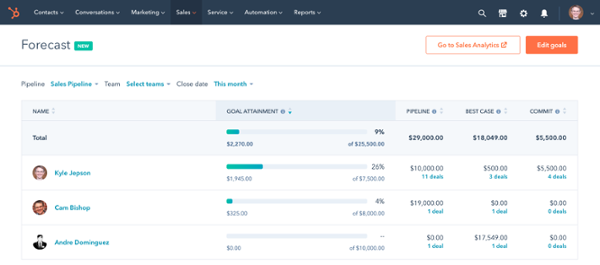
These reports show the amount of revenue that’s “on the table”—that is, the revenue you can expect to collect once ongoing deals are closed. Specifically, you can see the amount of revenue broken down by each stage of the sales cycle.
In addition, HubSpot doesn’t just display current data—it also allows you to make forecasts and anticipate possibilities based on existing trends. Some examples of forecast and pipeline reports include:
• Changes to deal history (for open opportunities/negotiations): This report displays changes to the status of negotiations, the amounts involved, and closing dates;
• Cascading sales pipeline: shows the initial proposal amount, the final amount, and changes recorded during the negotiation process;
• Manual forecast: This report allows you to view the projected revenue for each sales representative based on the forecasting tool;
• Weighted forecast: HubSpot takes the proposal value for each deal and multiplies it by the probability associated with the stage that deal is in; this can be done by team or for each sales rep individually.
2 - Funnel Reports
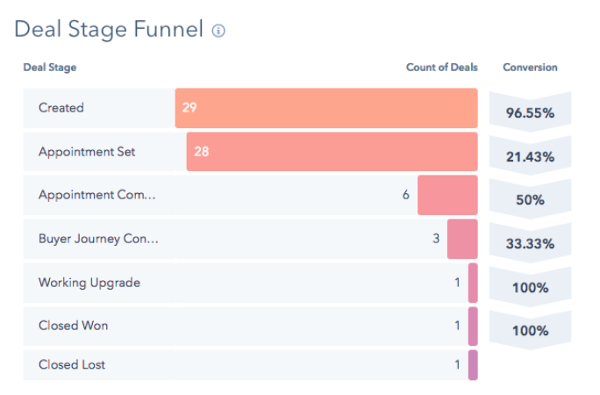
There are numerous funnel reports available in HubSpot that allow you to better understand the progress of your sales team’s activities. The two main ones are:
• Lifecycle Stages Funnel( how contacts/leads are moving through the buying funnel);
• Deal-stage funnel ( how deals are progressing through the different stages).
In funnel reports, you can analyze the percentage of contacts that have moved on to the next stage, as well as the cumulative conversion rate—that is, the percentage of contacts that have moved forward since the first stage.
This makes it possible to identify patterns and any critical stages where contacts are not moving forward, allowing you to consider necessary adjustments to sales activities at that stage.
3 - Productivity and Sales Performance Reports
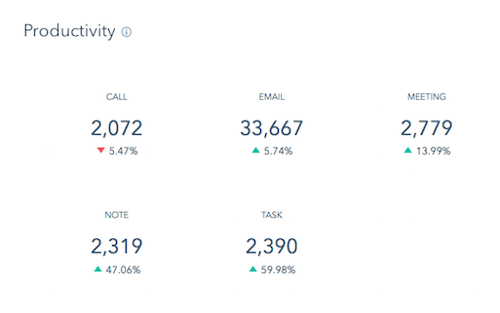
Get the information you need to better guide your sales team, optimize processes, and achieve better results. HubSpot offers a wide variety of reports to track calls, emails, meetings, and tasks completed by sales reps.
Some examples of reports include:
• Reports on completed activities such as calls, meetings, tasks, emails, and notes;
• Reports on chat interactions by sales rep or by team (on LiveChat or Facebook Messenger);
• Deals created by each sales rep or by team;
• Response time for each sales rep from the moment a lead is assigned to them until the moment contact is initiated.
• Average time spent on deals at each stage, by sales representative or by team.
4 - Sales Results Reports
When a deal is successfully closed—or, conversely, lost—there are also certain metrics that are important to analyze. And once again, HubSpot provides your company with some valuable reports, such as:
• Reasons for Loss: This report summarizes the number of deals that were lost and groups them by reason for loss, showing the stage at which they were lost and their respective value;
• Revenue from deals by source: this provides insight into the original source of the contact or company associated with the won deals;
• Deal speed: Shows the average number of days required to close a deal, by sales representative or by team;
• Won and lost deals: This report displays the number of deals that were won and those that were lost, by sales representative or by team.
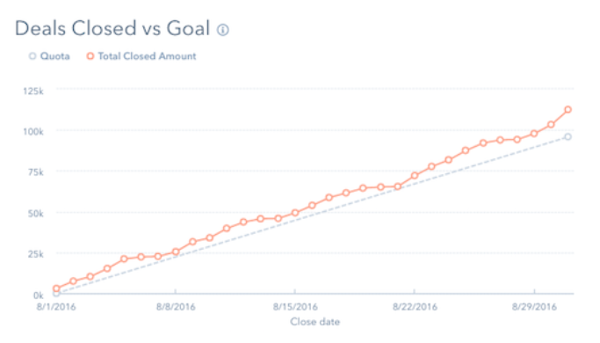
At the same time, it is also possible to compare the actual revenue generated by won deals with the estimated revenue (based on goals set for the team or for each sales representative).
Anything that can be measured can be improved. It is with this premise in mind that HubSpot provides all of these (and many others) sales reports: so that professionals have valuable information at their disposal that allows them to increase the effectiveness of their sales activities and, consequently, grow their business.
Do you have any additional questions about creating sales reports in HubSpot? Don’t hesitate to contact us.

Content originally published in June 2021.