.png?width=684&height=209&name=YouLead%202024%20-%20Digital%20Growth%20Agency%20branco-laranja%20(1).png "YouLead 2024 - Digital Growth Agency branco-laranja (1)")

December 9, 2020
HubSpot is constantly rolling out new features to improve the user experience on the platform. And last October was a month full of new developments.
Among these updates, we’d like to highlight one that will make HubSpot even more adaptable to the specific needs of each business: custom objects.
What are custom objects?
Objects are ways to store and structure data. Until now, there were five default object types on the platform: contacts, companies, deals, products, and tickets.
However, no two businesses are alike, and—especially for those with a higher level of complexity—this way of organizing information could prove insufficient. That’s why HubSpot developed custom objects, which offer every business the flexibility and opportunity to build a data model tailored to its specific needs.
How do custom objects work?
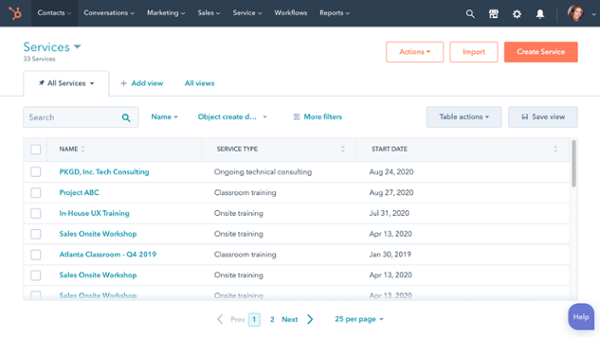
As the name suggests, these objects will vary depending on each company’s specific situation. But here are just a few examples of how these objects can be useful:
- For a car dealership, custom objects could be the makes and models of each car sold;
- For a real estate agency, they could be the properties;
- For a technology company, they could be all the IT solutions and services offered.
The possibilities are endless, and each organization can customize these objects according to what is most central to its business.
Since custom objects more accurately reflect your business within the CRM software, they enable deeper segmentation and more personalized marketing campaigns.
Beyond that, everything else works exactly the same way as with any other existing object in HubSpot. You can import data, build workflows, create reports, and much more. This means there’s no need to adjust or train the teams using the tool.
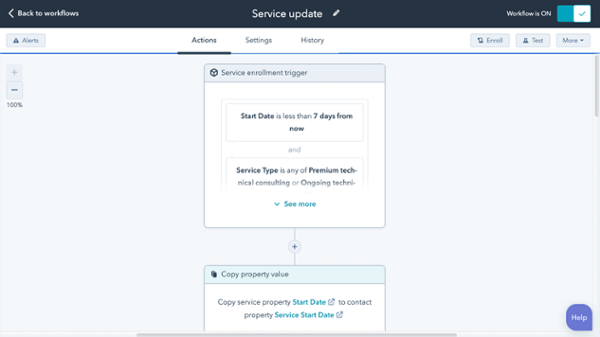
No additional hassle—just benefits when it comes to data storage and management. Discover custom objects now, available in the Enterprise version of HubSpot.
Currently, the only way to create custom objects in HubSpot is via the API. View the full documentation.
Want to learn more about this feature? Watch the HubSpot User Groups Lisboa webinar, where we discussed what’s new in HubSpot for 2020 (with custom objects being one of the highlights).
If you have any other questions or concerns, we’d be happy to help.

Content originally published in November 2020 and updated in December 2020.